
For many districts, the Bell & PA system is still one of the most important communication tools on campus.
It tells students when to move. It helps the front office reach classrooms. It supports drills, schedule changes, and daily announcements. In an emergency, it may be the fastest way to get a clear message across a building.
But many legacy systems were built for bells and overhead paging only. They were not designed for flexible schedules, targeted alerts, mobile activation, visitor safety workflows, visual notifications, or district-wide consistency.
That is where Singlewire InformaCast can change the role of the Bell & PA system.
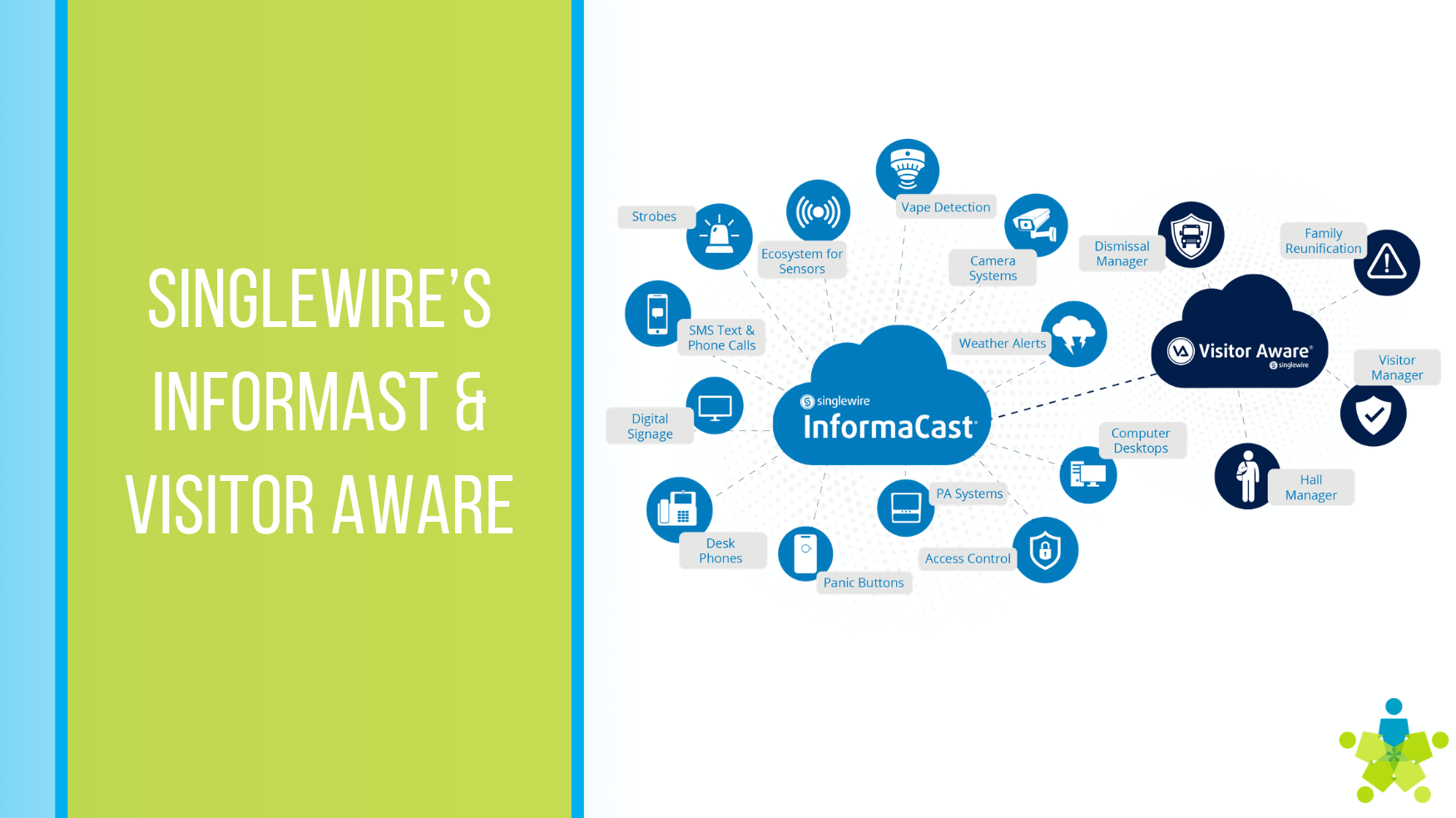
InformaCast gives schools a communication platform for daily operations and urgent alerts. It can support bell schedules, live and recorded paging, emergency notifications, panic-button activation, visual alerts, mobile notifications, and integrations with existing systems.
For districts planning a Bell & PA upgrade, the goal is not just louder speakers. The goal is a system that helps the right people hear the right message at the right time.
Why traditional Bell & PA systems fall short
A basic Bell & PA system can still do useful work. But schools now need more flexibility than many older systems can provide.
Common challenges include:
- Bell schedules that are difficult to adjust for testing, early release, weather delays, or special events
- Paging systems that only reach certain areas of a campus
- Analog speakers that still work, but are disconnected from modern alerting tools
- Front office teams that rely on manual announcements for routine reminders
- Emergency communication plans that depend on too many separate systems
- Limited ability to send different messages to different buildings, zones, or groups
For K-12 districts, communication and safety are closely connected. An upgraded system should support everyday communication and emergency readiness without adding unnecessary complexity.
What InformaCast can do for Bell & PA
InformaCast is often discussed as an emergency notification platform. That is accurate, but incomplete.
For schools, it can also serve as the communication engine behind a more flexible Bell & PA system.
1. Automate bell schedules
InformaCast includes a bell scheduling tool that can automate daily bell schedules and routine audio events. Schools can configure schedules for the year and make exceptions for exams, holidays, late starts, delays, closings, and other schedule changes.
That matters because school schedules are rarely static.
A district may need different schedules for elementary, middle, and high school campuses. A campus may need one schedule for regular days, another for testing, and another for early release. Administrators should be able to adjust those schedules without relying on a complicated manual process.
With the right design, InformaCast can help schools move from “someone has to remember to change the bells” to a more controlled, repeatable process.
2. Send live and recorded audio pages
Bell schedules are only one part of the system.
InformaCast can also send live or recorded audio pages to facility speakers. That gives schools more options for daily communication, including:
- Morning announcements
- Dismissal reminders
- Weather-related schedule updates
- Office-to-classroom paging
- Cafeteria, gym, hallway, or playground announcements
- Pre-recorded messages for common events
Recorded messages can also improve consistency. Instead of relying on a rushed announcement during a stressful event, schools can prepare approved messages in advance.
3. Target messages by group, zone, or building
Not every message needs to go everywhere.
InformaCast supports groups and zones, allowing audio pages to go only to specified devices, floors, wings, or areas.
For schools, that can reduce disruption.
A message for the gym does not need to interrupt a testing room. A bus dismissal update may only need to reach certain grade levels. A maintenance announcement may only apply to one wing. A district-level message may need to reach every campus.
The value is control. Schools can communicate clearly without over-broadcasting every message.
4. Reuse existing analog speakers where it makes sense
A Bell & PA upgrade does not always require replacing every speaker at once.
InformaCast can integrate with legacy analog paging systems in multiple ways, including through zone controllers, existing paging amplifiers, analog speakers, and phone-system-based paging interfaces.
That creates room for a phased approach.
If a district has analog speakers that still perform well, DPI can evaluate whether those speakers should be repurposed as part of the upgraded communication system. That can help districts modernize the control layer while making practical use of existing infrastructure.
This is especially useful for multi-campus districts. Instead of forcing a full rip-and-replace on day one, the project can prioritize the highest-need spaces first, then phase additional upgrades over time.
5. Add AtlasIED IP speakers for new coverage and modern endpoints
Some spaces need more than legacy paging.
New buildings, renovated wings, noisy areas, outdoor-adjacent spaces, gyms, cafeterias, and high-traffic corridors may benefit from IP speaker endpoints. AtlasIED IP speakers can support audio broadcasts, bell schedules, pre-recorded announcements, and advanced alerting across a networked architecture.
Depending on the selected model, AtlasIED IP speakers may also include features such as integrated microphones, LED flashers, and LED displays.
That gives districts more design options.
A practical upgrade may combine repurposed analog speakers in areas where they still make sense with AtlasIED IP speakers in spaces that need better coverage, endpoint control, talkback, visual indication, or future-ready network connectivity.
Bell & PA is only the start
The biggest advantage of InformaCast is that it can extend beyond bells and paging.
InformaCast can support alerting, communication, and response workflows during routine operations and emergencies. Alerts can be initiated manually or through connected systems, including mobile and desktop apps, wearable badges, mounted panic buttons, IP phones, web browsers, emergency calls, physical security systems, severe weather feeds, fire systems, video surveillance, and other integrations.
For schools, that means the same platform supporting bells can also support broader communication workflows.
Emergency alerts
InformaCast can send attention-getting audio, text, and visual alerts across integrated devices.
This matters because emergencies do not wait for someone to reach a microphone.
A teacher, administrator, or staff member may need to activate an alert quickly. A severe weather event may require automated monitoring. A fire system or other connected system may need to trigger a notification workflow.
InformaCast can help connect those activation points to the communication channels people actually notice.
Visual notifications
Audio is important, but it should not be the only layer.
School environments are noisy. Some spaces may be difficult to hear in. Some students, staff, or visitors may need visual cues.
A stronger design uses multiple channels: speakers for immediate audio, signage or displays for visual reinforcement, and mobile or desktop notifications for staff awareness.
Panic-button activation
InformaCast can be activated through multiple panic-button options, including wearable badges and mounted buttons.
For schools, this can support faster staff-initiated communication.
A staff assistance request and a school-wide emergency may require different workflows. The system design should reflect those differences, with approved messages, escalation paths, and notification groups defined in advance.
Incident response workflows
A PA announcement may start the response. It does not complete it.
InformaCast can support response workflows from the initial alert through resolution, including access to resources such as location maps, camera links, stakeholder calls or virtual meetings, 911 alerting, and reunification support.
That makes planning important.
The technology should match the district’s response protocols. Messages, permissions, locations, escalation paths, and integrations should be documented before the system is needed.
Where Visitor Aware fits
Visitor management is another part of campus communication and safety.
Singlewire’s Visitor Aware includes tools for visitor and volunteer screening, guest pre-approval, check-in workflows, dismissal management, hall management, and broader safety workflows.
Visitor Aware should not be treated as a separate island.
When paired with InformaCast, visitor-related information and safety workflows can become part of a broader communication strategy. For example, if a visitor issue requires action, the district can think through who should be notified, where alerts should appear, and which messages should be delivered.
The value is not just screening. The value is connecting visitor awareness to response. Or you have the option of using your existing system. InformaCast is built on an open system allowing communication to flow to it or from it.
What a phased Bell & PA upgrade can look like
Every district has different buildings, cabling, speakers, policies, and budgets. A practical upgrade starts with discovery.
A typical planning process may include:
- Inventory existing speakers and amplifiers. Identify which analog speakers can be repurposed, which zones need improvement, and which spaces have coverage gaps.
- Map bell schedules and daily announcement needs. Document schedule variations by school, grade level, testing day, late start, early release, and emergency mode.
- Define paging zones. Decide which messages should reach the whole district, one campus, one wing, one floor, or one specific group.
- Evaluate IP speaker needs. Identify spaces where AtlasIED IP speakers may add value through network control, talkback, LED indication, or better endpoint coverage.
- Plan emergency activation paths. Define who can trigger alerts, which devices can initiate them, what messages are approved, and who receives each alert.
- Connect visual and mobile channels. Determine where audio should be reinforced with signage, desktop notifications, mobile alerts, or other endpoints.
- Document training and support. Keep the system usable for front office staff, administrators, teachers, security teams, and district technology staff.
DPI’s role is to help districts connect these decisions into one workable system. The end result should be easy to operate, reliable in daily use, and designed around the realities of school buildings.
What to look for in an upgraded Bell & PA system
As districts evaluate InformaCast, Visitor Aware, analog speaker reuse, and AtlasIED IP speakers, the best question is not “Can the system make announcements?”
The better question is: “Can the system support how our schools actually communicate?”
Look for a design that can:
- Automate complex bell schedules
- Support live and recorded paging
- Target messages by zone, group, building, or district
- Reuse existing analog speakers where appropriate
- Add IP speakers where better control or coverage is needed
- Deliver audio, visual, desktop, and mobile notifications
- Connect emergency activation methods to approved response workflows
- Support visitor-related safety processes
- Give staff a simple way to use the system under pressure
A Bell & PA system should not be another disconnected tool. It should be part of a district-wide communication strategy.
Build a Bell & PA system that works beyond the bell
Singlewire InformaCast gives schools a path to modernize Bell & PA without losing sight of daily operations. It can help automate schedules, simplify announcements, target messages, support emergency alerts, and connect with existing and new speaker infrastructure.
When combined with Visitor Aware and a thoughtful endpoint strategy, including repurposed analog speakers and AtlasIED IP speakers where appropriate, districts can build a communication system that supports both routine school days and urgent moments.
DPI helps schools design and integrate these systems around the people who use them every day.
```


Darlene Rankin
Darlene Rankin is the Education Business Development Manager at Data Projections, Inc. She is an accomplished education technology leader with over twenty years of experience, including twenty-four years as Director of Innovation and Instructional Technology at Katy ISD in the Greater Houston Area. In 2025, she joined DPI to focus on expanding AV technology solutions for Texas schools and supporting innovation, collaboration, and student success.