
What Is Mass Notification for Schools? How IP PA, InformaCast, and Visitor Management Work Together
A mass notification system for schools is a connected communication platform that sends everyday announcements and emergency alerts across PA speakers, bells, displays, desktops, mobile devices, and other endpoints from one coordinated workflow.
For districts evaluating how to replace an analog school PA system, the goal is not just louder speakers. The goal is faster, clearer communication across classrooms, hallways, gyms, cafeterias, offices, outdoor areas, and mobile staff—without forcing administrators to manage separate tools in the middle of an incident.
That is where IP-based PA, mass notification software, and visitor management start to work together. A modern school communication stack may include AtlasIED IPX hardware for network-connected audio and visual endpoints, Singlewire InformaCast for alert activation and message delivery, Visitor Aware for front-office visitor screening and management, and optional IntelliSee AI threat detection for districts that want to add visual intelligence to existing camera systems.
We help K-12 districts design these systems around real campus operations: bell schedules, daily paging, emergency messaging, office workflows, teacher ease of use, and procurement requirements. The result is a communication environment that supports both ordinary school days and high-pressure safety events—without unverified claims or one-size-fits-all design.
Why analog PA and bell systems fall short in emergencies
Analog PA and bell systems were built for a simpler job: make an announcement, ring a bell, and move people through the day. Many still work for basic paging. The problem is what happens when the school needs targeted, coordinated, multi-channel communication.
In an emergency, a campus may need to notify classrooms, front-office staff, administrators, law enforcement contacts, mobile staff, and people outside the building. A traditional analog PA often depends on fixed zones, legacy cabling, limited diagnostics, and manual operation. If a speaker is down, a zone is misconfigured, or an office user is away from the console, the system may not give staff the visibility or flexibility they need.
Analog systems can also separate audio from visual communication. That matters in noisy areas, during passing periods, in cafeterias and gyms, and for people who may not hear or understand an overhead message clearly. AtlasIED IP endpoints with visual displays and flashers can reinforce audible messages with visual cues, helping schools communicate in more conditions than audio alone.
A school mass notification system should solve three communication gaps:
- Reach: Can the message reach the right rooms, zones, campuses, staff, and devices?
- Clarity: Can people understand what is happening and what action to take?
- Control: Can authorized users activate the right message quickly, with fewer steps?
Replacing analog PA should start with those questions—not with a product list.
What IP PA System changes
An IP PA system uses the school’s data network to connect speakers, horns, displays, clocks, microphones, and other endpoints. Instead of relying only on separate analog wiring, IP endpoints can be addressed, monitored, and integrated into broader communication workflows.
AtlasIED IPX endpoints are designed as IP-based communication devices that can deliver notifications through speakers, displays, LED flashers, and related endpoint features. AtlasIED describes IP speakers as voice-focused devices built to reproduce announcements clearly for general paging and emergency use.
For schools, this matters because an IP PA system can support:
- Daily announcements
- Bell schedules
- Zone paging
- Emergency & Regular daily audio messages
- Visual text alerts
- LED flashers
- Classroom or office endpoints
- Integration with mass notification software
- Phased migration from legacy infrastructure
Phasing is often important. A district may not need to remove every analog speaker at once. Some AtlasIED IP-to-analog gateway options can help connect network-based communication platforms to analog amplifiers or speaker zones, depending on the existing system design and project requirements.
That gives districts a practical path: modernize the communication core, prioritize high-need areas, and phase the rest based on budget, construction schedules, and campus risk.
How InformaCast connects PA, displays, desktops, and mobile alerts
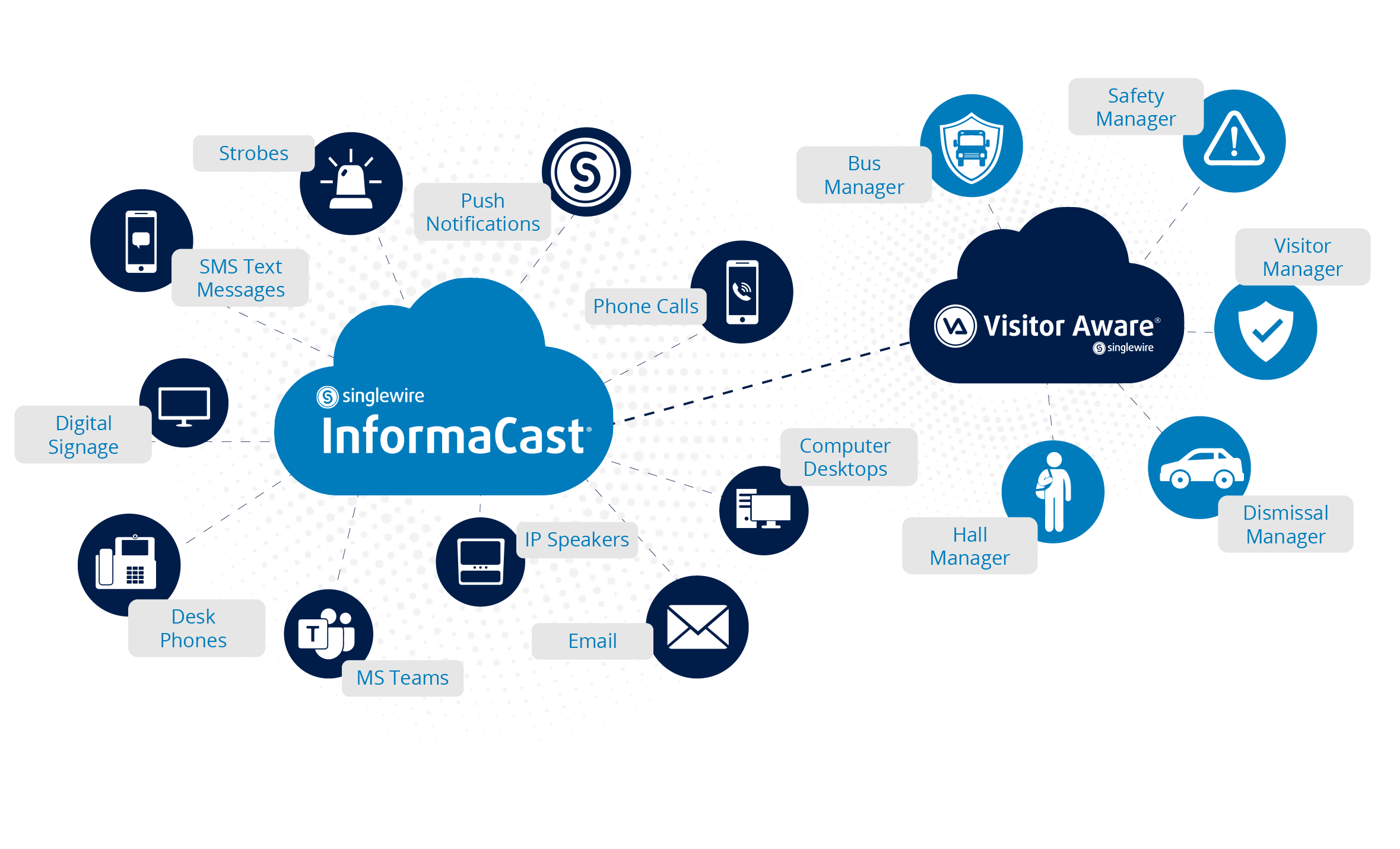
Singlewire"s InformaCast is the software layer that helps schools activate and distribute notifications across multiple channels. InformaCast can send messages to overhead speakers, desktop computers, desk phones, digital signage, mobile phones, 2-way radios and other connected devices.
In a K-12 environment, that means one alert workflow can reach more than the PA system. For example:
- A lockdown message can play over IP speakers.
- A matching text message can appear on supported displays.
- Desktop notifications can appear for office staff.
- Mobile alerts can reach staff who are away from their desks.
- Follow-up messages, such as an “all clear,” can be sent when appropriate.
It also supports alert activation through options such as mobile apps, desktop shortcuts, configured desk phone keys, mounted buttons, and wearable alert badges.
For district leaders, the value is operational. Staff should not have to decide which system to use while an incident is unfolding. InformaCast will automatically notify based on the information that was gathered during the design phase. The design phase defines who can trigger an alert, which messages are available, where each message goes, and how the district handles testing, training, and governance.
Where AtlasIED IPX hardware fits
AtlasIED IPX hardware provides the physical communication endpoints that deliver audio and visual alerts across campus spaces. Depending on the design, endpoints may include IP speakers, horns, displays, talkback features, LED flashers, or related devices.
In a school setting, these endpoints can support both everyday communication and emergency messaging. Daily bell schedules and announcements use the same communication backbone that can also support urgent alerts. That helps districts avoid separate, disconnected systems for routine operations and safety workflows.
IP endpoints are registering directly with InformaCast and supporting visual text and audio broadcast for advanced alerting, bell schedules, pre-recorded announcements, scheduled announcements, and intercom use.
Our role is to map the endpoint design to the building. A classroom, gym, hallway, cafeteria, parking area, and front office do not have the same acoustics or communication needs. A good design considers ambient noise, ceiling conditions, network availability, cabling routes, power, sightlines, and the existing PA infrastructure.
Where Visitor Aware fits
Visitor management is a separate but connected part of the campus safety workflow. While PA and mass notification systems focus on communication, visitor management focuses on who is entering the building, why they are there, and how the front office handles check-in.
Visitor Aware is a visitor management for schools, including features such as visitor check-in, badge printing, student attendance-related workflows, volunteer management, and emergency management tools.
In a coordinated school safety design, visitor management can support front-office awareness while the mass notification system supports communication. The two should be planned together so staff know what happens when an event starts at the entrance, office, or lobby.
For example, a suspicious visitor event may require office staff to follow district policy, notify administrators, and activate the right communication workflow. The technology should support that policy. It should not replace it.
That is why we start with process: who checks in visitors, who receives alerts, who can initiate a campus-wide message, who confirms an all-clear, and how each workflow is documented and trained.
Optional: IntelliSee AI threat detection
Some districts also consider AI threat detection as an added layer. IntelliSee is a platform AI-powered computer vision that can work with existing cameras to detect categories such as weapons, falls, unauthorized access, crowd events, and other risks. Video analysis can run locally on an IntelliSee appliance.
AI detection as an optional input into a broader safety workflow—not as a standalone safety solution. Districts should review privacy policies, camera locations, alert routing, false alert procedures, administrator permissions, and parent/community communication before deployment.
The right question is not “Can AI detect something?” The better question is “What happens next, who is notified, and how does the district verify and respond?”
How the pieces work together
A complete school mass notification system may look like this:
1. Detection or initiation
An alert may begin from an authorized staff action, office workflow, panic button, mobile app, desktop shortcut, visitor management event, or optional AI detection input.
2. Message orchestration
InformaCast manages the notification workflow, message type, target audience, channels, and escalation path based on the district's or organization's workflows.
3. Audio and visual delivery
AtlasIED IPX endpoints deliver announcements, tones, text, flashers, and other supported alert outputs across classrooms and common areas.
4. Off-site and staff communication
Mobile notifications, email, SMS, push alerts, and desktop alerts can extend communication beyond the overhead PA system, depending on the district’s configuration.
5. Documentation and follow-up
Visitor management, incident workflows, and district procedures help staff track what happened, communicate next steps, and return to normal operations when appropriate.
The most effective systems are not just integrated technically. They are integrated operationally. That means the district has clear roles, approved messages, trained staff, tested workflows, and a support plan.
Procurement path: TIPS, BuyBoard, and DIR
For Texas school districts and other public entities, procurement can shape the project path as much as the technology does.
We can support procurement planning through cooperative purchasing vehicles where available and appropriate, including TIPS, BuyBoard, and DIR.
A practical procurement path often includes:
- Existing system assessment
- Campus walkthrough
- Network and cabling review
- Stakeholder workflow review
- Basis-of-design recommendation
- Budgetary estimate
- Contract review
- Phased implementation plan
- Training and testing plan
We can help districts decide whether to replace, integrate, or phase legacy PA and bell systems based on campus conditions and procurement timing.
How to replace an analog school PA system
A successful replacement starts before installation. Use this sequence:
1. Audit the current system
Document amplifiers, speakers, zones, bell controllers, paging stations, head-end equipment, wiring paths, and known failure points. Identify areas where announcements are hard to hear or understand.
2. Define communication workflows
List daily and emergency use cases. Include bell schedules, morning announcements, office paging, weather alerts, lockdowns, evacuations, shelter-in-place messages, and all-clear procedures.
3. Map endpoints by space
Classrooms, gyms, cafeterias, hallways, restrooms, outdoor areas, libraries, and administrative offices need different endpoint strategies. Match audio and visual outputs to each space.
4. Decide what to keep, bridge, or replace
Some analog zones may be usable during a phased migration. Others may need replacement because of performance, coverage, or maintenance issues.
5. Integrate software and permissions
Configure InformaCast workflows, users, message templates, activation methods, and escalation paths. Confirm who can send which messages.
6. Train and test
Test the system under normal conditions before relying on it during an emergency. Train office staff, administrators, technology teams, and designated campus personnel.
See how we approach campus safety communication
We design K-12 communication systems that support campus-wide alerts, teacher clarity, signage reach, and practical district operations. Our work focuses on reliable systems, simple user experience, and lifecycle support—not unnecessary complexity.
Explore related resources:
Schedule a Live Demo
See how IP PA, InformaCast, visitor management, and optional AI detection can work together in a district-ready communication workflow.
FAQ
What is a mass notification system for schools?
A mass notification system for schools is a platform that sends routine and emergency messages across multiple channels, such as PA speakers, bells, digital signage, desktops, mobile phones, and other connected devices. The goal is to help the right people receive clear instructions through the right channels.
How much does it cost to replace an analog school PA system?
Cost depends on campus size, speaker coverage, cabling conditions, network readiness, endpoint selection, software licensing, installation complexity, and whether the district phases the project. We will confirm pricing after a site assessment and scope review.
How long does implementation take?
Timeline depends on the number of campuses, existing infrastructure, procurement path, device availability, network readiness, and school calendar constraints. Many districts plan work around breaks, summer schedules, or phased campus rollouts to reduce disruption.
Can we keep part of our existing PA system?
Often, yes. Some districts can bridge parts of an analog system into an IP-based design while replacing higher-priority areas first. DPI should verify this during the system audit because legacy equipment, wiring, amplifiers, and speaker zones vary by campus.


Darlene Rankin
Darlene Rankin is the Education Business Development Manager at Data Projections, Inc. She is an accomplished education technology leader with over twenty years of experience, including twenty-four years as Director of Innovation and Instructional Technology at Katy ISD in the Greater Houston Area. In 2025, she joined DPI to focus on expanding AV technology solutions for Texas schools and supporting innovation, collaboration, and student success.